 You're going to want Android Marshmallow. Google's latest version of
Android may sound like a single headline feature followed by a list of
tiny improvements, but they all add up to one important update — there's
a reason Google is calling this release Android 6.0.
Marshmallow is going to make Android able to do a lot more for you,
all while making key refinements across the OS that address longstanding
issues. All in all, we're looking at a smarter, sleeker, and more
useable Android. So yeah, you're going to want to update.
Of course, as always, when you can update is going to depend on who
made your phone. Nexus devices will be updated almost immediately, but
phones from Samsung, Motorola, Sony, LG, and others are going to be on
their own timelines, some fast, some slow, some nonexistent. Those
phones may also get support for some features and not others, depending
on how the device is customized.
Google may be announcing Marshmallow's official release — coming next week
— today, but it actually introduced its new features back in May. In
case you missed the announcement or have forgotten what happened in the
months since, here are the features we're most excited for in the new
release of Android.
Google Now on Tap
Google Now on Tap is easily Marshmallow's standout feature. It takes
Google Now — the predictive assistant that's been beside your home
screen for a couple years — and lets it crawl through your apps so that
you can get extra info on basically anything almost instantly.
Google Now will read your screen and tell you about what it sees
Here's how it works: your press and hold the home button while inside
of any app, and Google Now will read the screen, look for anything
interesting — like the name of a celebrity, an event, or a location
— and then return information on what it sees in a little popup box on
the bottom of the screen.
If someone texts you the name of a restaurant, for instance, Now on
Tap might see its name and present you with its location on a map. Or if
you're on a news story about a celebrity, Now on Tap might pull up
their information from Wikipedia or give you the chance to jump to their
page in the IMDb app.
It's an incredibly cool feature, and our initial tests showed it
working quite well (albeit under a controlled environment). This is
going to be a big deal in Marshmallow and — more than likely — future
versions of Android as well.
Case-by-case app permissions
This sounds insanely boring, but it's a really important update. To
date, Android apps have asked you during their install process for
permission to access everything and anything that they might need:
things like your camera, location, message history, and so on. Often
enough, you'll see all sorts of things that it seems like an app
shouldn't need access to, but you don't have the option of saying no to
just one item or asking what anything is used for.
Under Marshmallow, this is going to change. Developers will now be
able to ask for permissions on a case-by-case basis. That means when you
go to open up the camera in Instagram, for instance, Instagram could
deliver a pop-up asking if you want to let it access your camera. That
way you know exactly when an app is using a feature and why it's using
it. It also means you can download and install an app, use most of it,
but prevent it from doing one or two things that you disapprove of.

Apps will have to update to the new way of doing things before all of
this starts to happen. For now, Marshmallow will still let you go into
settings to deal with the apps you already have set up. Apple has dealt
with permissions on iOS in this manner for a while now, so some people
may already be familiar with this approach. Basically, it's a good idea,
and it's about time it hit Android.
Fingerprint support
Fingerprint sensors have already popped up here and there on Android
phones, but soon, they're probably going to be everywhere. That's
because Google is building dedicated support for fingerprint sensors
into Android, so that phone makers don't have to code it all in on their
own. That means your next Android phone will likely let you use a
fingerprint sensor to unlock your phone, make payments, and log into
various apps and services. Basically, it's going to be a huge
convenience for both the people making Android phones and the people
using them.
USB Type-C

Everyone hates buying new cables, but this time it's worth it. USB
Type-C (also called USB-C) is a tiny new reversible USB format that's
kind of sweeping the tech industry. Before you know it, it's going to be
used to charge most phones, tablets, and laptops, and for transferring
data and video between devices. Marshmallow adds support for USB Type-C
for Android phones and tablets, so there's a very good chance that your
next phone will use it. Get ready — you'll never stab a Micro USB cable
in the wrong direction again.
Doze
It seems like every new version of every operating system makes a
claim about improving battery life, but Google's latest improvement may
actually be a meaningful one. Doze, a new feature in Marshmallow,
monitors how your device is being used and adjusts app activity
accordingly. Basically, if you aren't using a tablet all day while it
lies on your table, Marshmallow will simply pause your apps so they
don't drain through your battery. That means apps won't be primed with
new content the second you open them, but Google says a device's standby
time could double. Not a bad tradeoff.
Better cut, copy, and paste
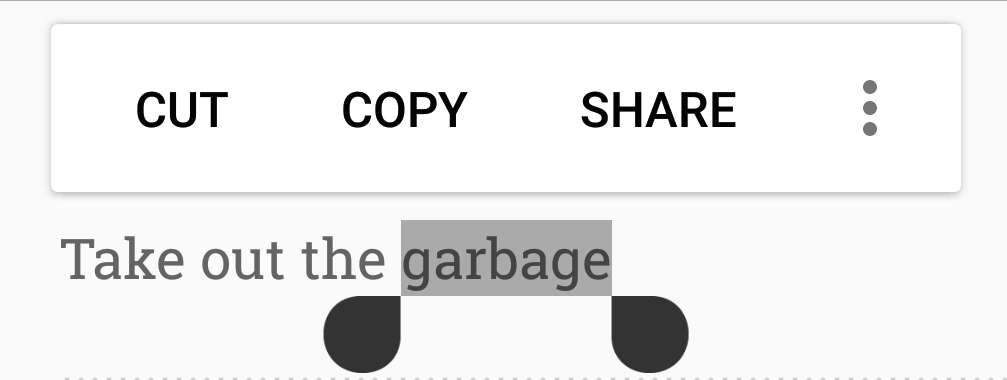
Another small but meaningful change in Marshmallow is the way that it
handles copy and pasting text. Rather than making you jump up to the
top of the screen to find and decipher the cut, copy, and paste buttons,
Marshmallow will float the options directly above the text you've
selected. It's pretty much identical to how iOS does it, and it's a
solid change. Even if it's only a small change, it's for something that
you use a lot.
Chrome works inside other apps
It's always frustrating getting kicked out of an app and over to the
web where you have to wait for a site to slowly load, so Google is doing
something about it. With a feature called Chrome Custom Tabs,
Marshmallow will allow apps to preload certain web content before
sending you over to an in-app Chrome tab. That idea is that you're still
visiting a live-updating website, but the experience should be much
smoother.
Source: The Verge



 I remember the days


 Even it is a "Yes" and "No" Poll, Twitter has added more to her wing by adding the polls features for users to use. Though, this is on a trial mode as only some staff can create the polls while any twitter users can participate within 24 hours the polls is released but we do hope that this poll. The poll can be created on both the twitter app and the PC interface and it is just a small chart after media and occasion


